Adrian Kingsley-Hughes/ZDNET
Ugreen MagFlow Pro 10,000mAh
4.3
Pros & Cons
-
All in all, a premium-grade power bank. -
Has wireless charging and two USB-C outputs. -
Built-in USB-C cable that’s acts as a lanyard.
-
Micro-pump adds a failure point.
I’ve tested a lot of power banks, but I’ve never tested one with built-in liquid cooling — and that’s because the Ugreen MagFlow Pro is, according to the company, the first of its kind.
Also: This $50 power bank is safer than my lithium-ion battery – and it’s coming on my next flight
And it’s pretty cool (pun intended).
At first glance
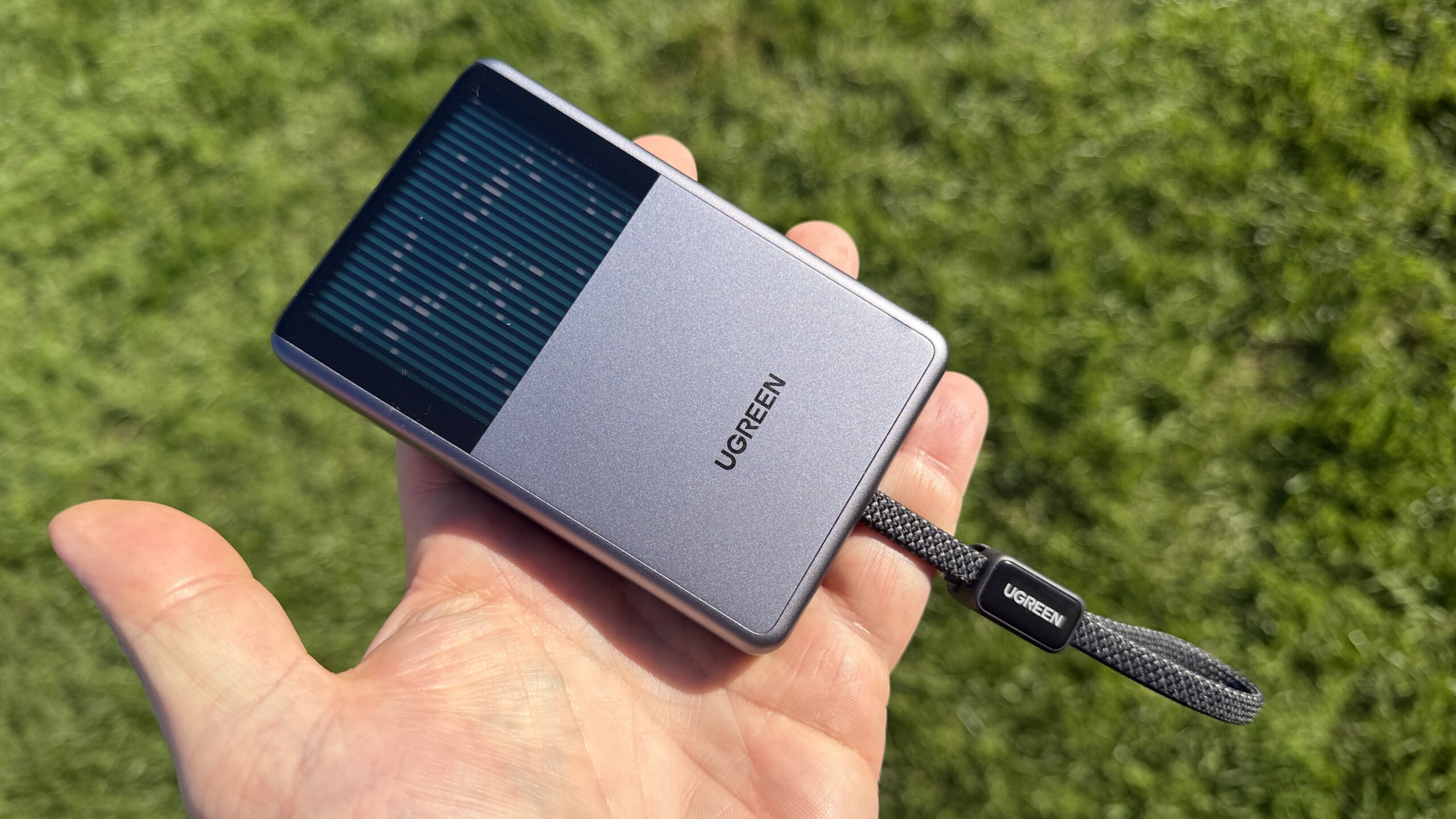
At first glance, the MagFlow Pro looks like any other 10,000mAh wireless power bank. It’s a palm-sized slab measuring 4.27 x 2.78 x 0.63 inches and weighs 7.8 ounces. Inside is a 10,000mAh battery pack that delivers up to 25W through the Qi2.2-certified magnetic wireless charger. Two USB-C ports on the bottom can deliver up to 45W and charge the unit at 30W. The battery capacity is enough to charge an iPhone 18 Pro Max once, with a bit to spare.
Also: I’ve been testing solar gadgets for a long time – they’re finally worth buying
The battery cell is a newer type that’s packed with multiple layers of protection (13 according to Ugreen) and can pass crush, needle puncture, and 284°F heat tests without catching fire or exploding. It’s good for at least 800 charge/discharge cycles and has the Airline-Approved logo stamped on it in case you get asked questions about it while boarding.

One port has a USB-C cable attached, which is handy because it means you’ve always got one that can act as a lanyard.
On the bottom there’s a single button, and on the side is the tiniest multi-function color display that I think I’ve seen on a device. It’s about half the size of a postage stamp, but it’s pin-sharp and clear to my aging eyes.

As for the power bank side of the MagFlow Pro, it’s what I expect of a Ugreen product. It’s robust, well-made, and does what the spec sheet says. I read a couple of customer reviews online that mentioned the unit could throttle charging during use. However, I couldn’t trigger this behaviour without seriously overheating the unit, so I’m not sure what was going on there.
The good stuff
But we’re not here for the power bank — really, we want to know about the liquid cooling.

On the front of the unit (or is it the back? It’s the side opposite the Qi2.2 charging pad) is what looks like a Matrix-style animation, but it’s actually the coolant making its way through the pipework of the active cooler.
Also: I found 6 forgotten cables that are still surprisingly useful
The animation is static when the power bank is idle (although you can shake it to prove to yourself that there’s actually liquid inside). However, everything comes to life when you start using the power bank (or you can press and hold the button to make the liquid move).
The liquid moves using a micro-pump, which, according to Ugreen, uses a small amount of power — 0.02W — and can make a noise or vibration when it works (although I couldn’t hear or feel a thing).

The liquid cooler sits between a copper heat-spreading foil and the aluminum heatsink shell. The power bank can still overheat and throttle output if it gets too hot, but the idea is that this liquid cooling helps spread and dissipate the heat generated by the power bank in use.
Also: Our 11 favorite gadgets and gizmos to gift the person who has everything
Every joule of heat the power bank generates still has to exit through the case. Liquid cooling doesn’t reduce the amount of heat the unit has to get rid of (in fact, that micro-pump actually adds a tiny amount to the equation).
Is it a gimmick?
The key question is, is it worth adding more parts to a power bank — specifically a moving part — when passive cooling works just fine? I’m not exactly sure.


In terms of cooling, Ugreen has done a good job of eliminating hotspots on this power bank. A power bank is usually either in your hand (and your hand is right on the battery) or it’s in a pocket (where it’s 50/50 whether the battery is against your leg). While the power bank definitely gets warm in use (that heat has to go somewhere), it never gets what I call “worryingly hot.”
I also monitored the power bank with a thermal camera with the liquid cooling on and off. With the pump running, I noticed the liquid-cooler side was slightly cooler and the charging pad slightly warmer, which suggests the device is actually shifting heat about.
Also: Stop buying cheap SSDs and other storage drives – they’ll cost you
But there are plenty of power banks (and other devices) that move heat about with passive methods, such as heat spreaders and vapor chambers.
I resisted taking the unit apart because I want to keep using it to see whether the micro-pump is a failure point, or whether it’ll outlast the rest of the unit.
Final thoughts
The Ugreen MagFlow Pro is on sale for $95, which, according to Amazon, is 37% less than the full $150 price tag.
At $150, this would be a tough sell, but for $100, it’s in the same ballpark as other premium-grade 10,000mAh power banks, such as the Anker MagGo 2 Pro. At this price, the MagFlow Pro is not only a premium power bank, but it’s also a neat bit of tech that makes a cool conversation piece.

See full bio
About the Author